MOS / Modules / Safety
HYDRANT WATCH BY MOS
Running in production

Fire Safety — Hydrant Watch

The path to every hydrant stays clear — and someone always knows when it is not.

Virtual lineAlert in secondsEscalates to WhatsAppTime to clearExisting cameras
See it on my machineSee the screen
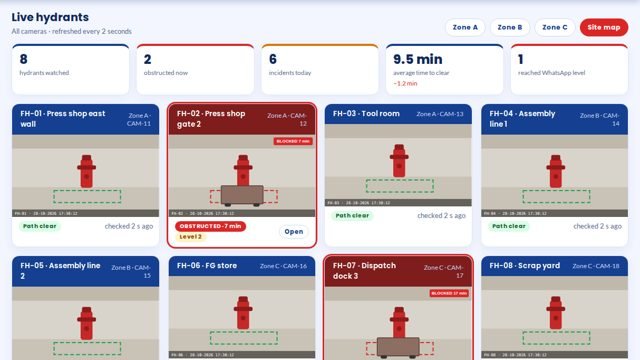
Fire Safety — Hydrant Watch screen 1 in MOS
The screen

What it looks like in MOS

A camera watches each fire hydrant through a virtual line. Anything left on that line raises an alert to the area in-charge, then escalates level by level — up to WhatsApp — until it is cleared, with a record of every obstruction and how long it stayed.

Download the one-pagerSee it on my machine
Product positioning

A blocked hydrant is found during the fire

Pallets and bins drift into hydrant paths; the next safety walk is next week.

“A virtual line around each hydrant on the existing cameras; anything left on it alerts the area in-charge and escalates to WhatsApp until cleared.”
Today
HydrantTrolley parkedSafety roundClearedseen on the weekly round
With Fire Safety
Camera lineAlertEscalationCleared and timedseen in seconds

Drawn, not promised: the top row is a blocked hydrant found on the next safety round. The bottom row is the same trolley crossing a virtual line, the area in-charge alerted at once, and the time to clear on record.

End-to-end flow

5 connected stages

Hover or tap a stage to see what is captured there.

01

Draw

Virtual line
  • Around each hydrant
  • On the existing camera
  • Once
02

Watch

All the time
  • Anything left on the line
  • Not a person walking past
  • Plant GPU
03

Alert

Within seconds
  • Area in-charge
  • With the picture
  • Level by level
04

Escalate

Until cleared
  • Up to WhatsApp
  • Acknowledged or not
  • Time to clear
05

Review

Zone-wise
  • Every obstruction
  • How long it stayed
  • Repeat spots
Continuous threadDraw→Watch→Alert→Escalate→Review
Part of the platform

Fire Safety runs on MOS

Not a standalone tool — a product on the MOS platform, sharing one login, one set of people and roles, and one database with every other module. The lit layers are the ones this product uses; the signal path shows how data moves through them.

  • MOS Edge runs inside the plant — interlocks and screens keep working if the internet does not.
  • MOS Central is a one-way mirror for head office and every plant in one view.
  • Your IT never opens an inbound port.
MOS CentralEvery plant, one viewin use
MOS EdgeYour plant serverin use
MOS CoreThe operating layerin use
MOS ConnectMachine connectivity
MOS VisionAI on the linein use
Core engine & extensions

What is core, what extends it, what is not claimed yet

The honest map, drawn as one thread. Filled nodes are in the product today; outlined nodes are other MOS modules on the same platform; dotted nodes are roadmap and never represented as available until built. Hover a node.

● Core

● Core — in the product today○ Extension — another MOS module◌ Roadmap — not claimed
Native engine

Core functionalities

Each card ends with the thing itself as it appears in MOS — not a description of it.

Draw

Once

  • Virtual line around each hydrant
  • On cameras the plant has
  • No new hardware on the floor
  • Tuned in the first week
Watch

Continuously

  • Anything left on the line
  • A person walking past does not trigger
  • Plant GPU
  • All shifts
Escalate

Until cleared

  • Area in-charge first
  • Level by level
  • Up to WhatsApp
  • Acknowledged or not
Review

Zone-wise

  • Every obstruction
  • Time to clear
  • Repeat spots
  • Per shift
Operational journey

6-step digital thread

Step through it or let it play. Each step: who does it, on what, what is captured, and the check that guards it.

Step 1 / 6
Step 1 · Safety

Draw the line

A virtual line is drawn around each hydrant on its camera view.

WhereZone setup
CapturedLines per hydrant
Guard / interlock—
● live in MOS
Where it sits

Your ERP or Tally runs the books. This adds the ground truth.

Your ERP / Tally typically givesFire Safety adds
A safety walk once a weekEvery hydrant watched all the time
A blocked path found during the fireAn alert within seconds, with the picture
A verbal reminderEscalation up to WhatsApp until cleared
No recordEvery obstruction with time to clear
Hardware & connectivity

Works with what a plant already has

Cameras

Existing IP cameras that see the hydrant and its path

Compute

A GPU machine on the plant network — shared with Gangway & PPE Watch

Escalation

WhatsApp for the final level

Server

MOS Edge in the plant

At a glance

The spec

What it connects to, where it runs and what it gives you — the short version your IT and your plant head both want.

ReadsExisting IP cameras
Runs onMOS Vision — a GPU machine inside the plant
Needs on siteCameras that see the hydrants; WhatsApp for escalation
OutputsObstruction events, escalation trail, time to clear, zone reports
Licensed byPer camera / per zone
Capability transparency

What is built, what extends, what is not claimed

Core — today

Virtual lines, obstruction detection, escalation to WhatsApp, time to clear, zone reports.

Extension

Gangway & PPE Watch on the same cameras and GPU.

Integration-dependent

Camera coverage of each hydrant is confirmed at site.

Roadmap

Fire-panel integration — not represented as available.

Capabilities depend on the plant's process and what is connected at site. Nothing on this page is represented as available until it is built and running.

What you get

5 outcomes

Alert within seconds Escalates to WhatsApp Time to clear recorded Zone-wise reports Existing cameras
Who uses it

Everyone sees what their job needs

Area in-charge

The first alert, with the snapshot

Safety officer

Open obstructions and escalations

Plant head

Zones that keep blocking hydrants

Auditors

A record of every obstruction

On site

What is needed in your plant

At each hydrant

A view from a camera the plant already has, or a new one.

In the plant

A GPU machine on the plant network.

For escalation

The people for each level, and WhatsApp numbers.

Rollout

From the first day to the first month

Day one

Lines drawn

A virtual line around each hydrant on its camera.

Week one

Escalation set

Who is told first, next and last, and after how long.

Month one

Every hydrant watched

Reports by zone and time to clear.

Questions

Asked about Fire Safety — Hydrant Watch

Does a person walking past trigger it?

No. Only something left on the line for longer than the set time raises an alert.

Can we use our CCTV?

Yes, where the camera sees the hydrant and its path.

Works with

The rest of MOS

On your own machine

See it on your own machine.

Tell us about your plant and what you want to see. We visit, connect one machine or station, and you watch your own data in MOS before anything is quoted.

  • A plant visit to see the line and the problem
  • One machine or station connected as a proof of concept
  • Your own data, live, on MOS screens
  • Scope, modules and timeline agreed in writing only after that
Thank you — request received.We will call you shortly to plan the visit.